
In today’s digital-first world, manually typing out text from scanned documents wastes time and introduces errors. That’s why we created OCR Document Manager — a simple, intuitive web app that extracts text from your files in seconds, directly from your browser.
🧐 What is OCR Document Manager?
OCR Document Manager is a responsive web app that allows you to:
- 📤 Upload PDF, JPG, or PNG files
- 🧠 Automatically extract text using OCR
- 💾 Store the extracted text and filename in a database
- 📚 View and manage your document records
Perfect for individuals, teams, and businesses looking to simplify their document workflow.
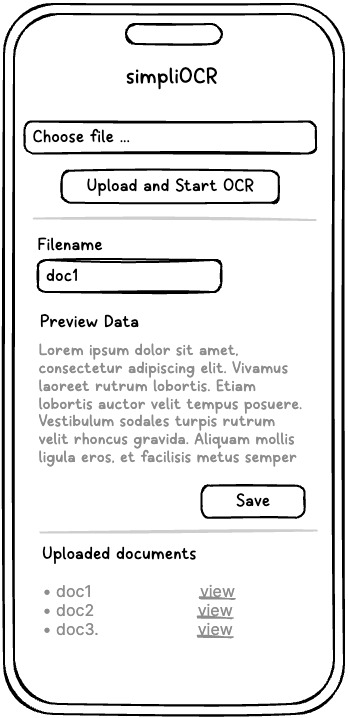
🔧 How It Works
- Choose a Document from your device
- Click “Start OCR & Save” to extract and store the text
- Preview & Manage the results in your personal document log
The app is optimized for both desktop and mobile use, making it your go-to tool on the go.
✨ Features
- ✅ Easy drag-and-drop upload
- ✅ Fast, accurate text recognition with Tesseract
- ✅ Live preview of extracted content
- ✅ Stored document history (filename + date)
- ✅ Clean, mobile-friendly interface
⚙️ Built With
- Frontend: Tailwind CSS / Bootstrap
- Backend: Flask, Django, or Node.js
- OCR Engine: Tesseract or server-based OCR
- Database: PostgreSQL or SQLite
🧑💻 Use Cases
- Convert printed records into searchable text
- Digitize academic or business documents
- Process ID cards, receipts, or handwritten notes
- Automate text capture in web-based workflows
📱 Mobile-Responsive
Whether you’re on a laptop or mobile phone, the interface scales seamlessly to ensure a smooth experience.
🌐 Try It Now
Explore the OCR Document Manager at:
👉 https://www.simplico.net
Latest Posts
- Your Attacker Might Already Be an AI Agent: What the OpenAI–Hugging Face Incident Means for Your SOC August 17, 2026
- Implementing ERPNext: A Practical Guide to the System, Its Document Model, and Core Workflows August 15, 2026
- Why Accounting Firms Are Moving Off Per-Seat Software — and What It Actually Takes August 10, 2026
- Implementing OCPI 2.2.1: A Developer’s Guide to Locations, Sessions, and CDRs August 7, 2026
- OCPI Explained: What CPOs and eMSPs Actually Need to Build for EV Roaming August 7, 2026
- The Landlocked Sea Bass: Building an Automated Feeding System for Marine Fish Far From the Ocean July 31, 2026