
カーボンクレジット計算ツールを作る方法
導入
企業が持続可能性を重視する中、カーボンクレジット計算ツールは、排出削減量を定量化するための重要な仕組みです。
このツールを使えば、自社の環境貢献を数値で証明し、報告やクレジット取引にも活用できます。
วิธีสร้างเครื่องคำนวณคาร์บอนเครดิตสำหรับธุรกิจของคุณ
บทนำ
ในยุคที่ธุรกิจต้องรับผิดชอบต่อสิ่งแวดล้อม “คาร์บอนเครดิต” คือหนึ่งในเครื่องมือสำคัญในการแสดงผลลัพธ์ด้านความยั่งยืน
เครื่องคำนวณคาร์บอนเครดิต (Carbon Credit Calculator) ช่วยให้คุณวัดการลดการปล่อยก๊าซเรือนกระจก และเปลี่ยนข้อมูลเหล่านี้เป็นเครดิตที่สามารถรายงานหรือนำไปขายได้
Continue reading “วิธีสร้างเครื่องคำนวณคาร์บอนเครดิตสำหรับธุรกิจของคุณ”
How to Build a Carbon Credit Calculator for Your Business
🌱 Introduction
As sustainability becomes a key business goal, many companies are now tracking how their operations reduce greenhouse gas (GHG) emissions.
Continue reading “How to Build a Carbon Credit Calculator for Your Business”
SimRoomで理想の部屋に変身:AIが叶えるインテリアデザイン
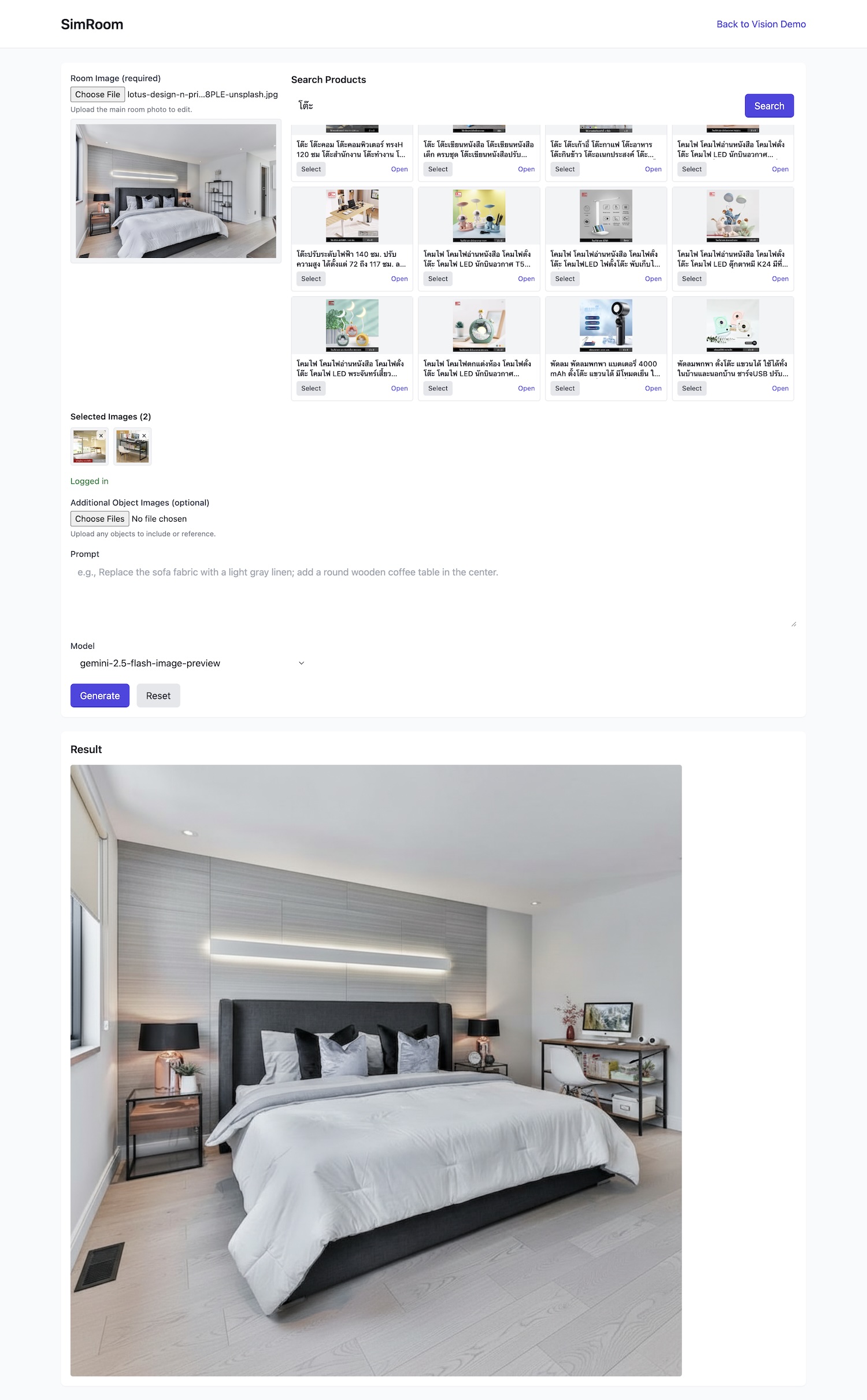
ベッドルームやリビングに立ちながら、こんなことを考えたことはありませんか?
「ベッドを変えたらどうなるかな? ランプを追加したら雰囲気は? 丸いコーヒーテーブルを置いたらもっと温かみが出るかも?」
เปลี่ยนห้องของคุณให้น่าอยู่ด้วย SimRoom: การออกแบบภายในด้วยพลัง AI
คุณเคยยืนอยู่ในห้องนอนหรือห้องนั่งเล่นแล้วแอบคิดไหมว่า:
“ถ้าเปลี่ยนเตียงใหม่ล่ะ? เพิ่มโคมไฟสักอันดีไหม? หรือวางโต๊ะกาแฟไม้กลมกลางห้องจะเข้ากันหรือเปล่า?”
Continue reading “เปลี่ยนห้องของคุณให้น่าอยู่ด้วย SimRoom: การออกแบบภายในด้วยพลัง AI”
Transform Your Room with SimRoom: AI-Powered Interior Design
Have you ever stood in your bedroom or living room and wondered:
“What if I change the bed frame? Or add a new lamp? Would a wooden coffee table make the room warmer?”
Most of us hesitate when shopping for furniture because it’s hard to imagine how the product will look in our actual space. Photos on e-commerce sites show the items beautifully, but not in your home. That’s where SimRoom comes in.
What is SimRoom?
SimRoom is your personal AI-powered interior designer. With just a photo of your room, you can try out different furniture, décor, and layouts — instantly, and without moving a single chair.
Think of it as a "magic mirror" for home design: upload a picture, pick products you like, and watch the room transform right in front of you.
How It Works
- Upload Your Room Image
Snap a photo of your room — bedroom, living room, or even office. The AI carefully preserves lighting, perspective, and proportions to keep things realistic. - Search for Products
Use the integrated search to browse real products — beds, tables, lamps, art pieces — all ready to be virtually placed in your room. - Select & Customize
Just click Select on items you want to try. You can also type prompts like:
“Replace the headboard with a wooden frame; add a painting above the bed; place a round coffee table in the center.” - Generate Your Dream Room
In seconds, SimRoom shows you the result — your same room, beautifully updated with the products you’ve chosen.
Why People Love It
- Confidence in Decisions: No more guessing. See exactly how a sofa, lamp, or painting will look in your real space.
- Save Time & Energy: Skip endless showrooms and avoid buying furniture that doesn’t fit your style.
- Creative Freedom: Play with different colors, layouts, and vibes — from minimal modern to cozy vintage.
- Shopping Made Smarter: Every product you test is linked to real stores, so if you love it, you can buy it instantly.
A Real-Life Example
Here’s a quick test we ran:
- Original Room: Modern bedroom with a clean gray theme.
- Selected Products: A minimalist nightstand, a warm bedside lamp, and a wall art piece.
- AI Result: The generated image preserved the room’s natural lighting while adding depth and personality with the chosen products.
It feels like stepping into a newly designed space — but all from a laptop screen.
Who Should Use SimRoom?
- 🏡 Homeowners & Renters: Perfect if you want to refresh your space without making expensive mistakes.
- 🎨 Interior Designers: A tool to quickly mock up ideas for clients.
- 🛒 Furniture Shoppers: Try before you buy, and avoid the pain of returns.
Why SimRoom is Different
Unlike basic AR furniture apps, SimRoom doesn’t just "stick" items awkwardly in photos. It understands:
- Perspective — ensuring chairs, tables, and beds look natural in size.
- Lighting & Shadows — making lamps glow realistically and wood textures match the mood of your room.
- Style Context — blending products seamlessly into your existing décor.
✅ Ready to see your dream room?
With SimRoom, interior design is no longer a guessing game — it’s playful, realistic, and fun.
👉 Try it now and discover how a few clicks can transform your space.
AI時代により賢くなるために ― 科学・数学・プログラミング・ビジネスの力
AI時代は、私たちの生活・仕事・創造のあり方を大きく変えています。生き残り、成長していくためには、AIツールを使えるだけでは不十分です。必要なのは、科学・数学・プログラミング・ビジネスという4つの柱に基づいた強固な基盤です。これらを身につけることで、あなたは未来においても価値ある「スマートな人材」となれるでしょう。
จะฉลาดขึ้นในยุค AI ได้อย่างไร ด้วย วิทยาศาสตร์ คณิตศาสตร์ การเขียนโปรแกรม และธุรกิจ
ยุค AI กำลังเปลี่ยนแปลงวิธีที่เราใช้ชีวิต ทำงาน และสร้างสรรค์ การจะอยู่รอดและเติบโตได้ ไม่ได้หมายถึงเพียงแค่การรู้จักใช้เครื่องมือ AI เท่านั้น แต่ต้องมีรากฐานที่แข็งแรงใน วิทยาศาสตร์ คณิตศาสตร์ การเขียนโปรแกรม และธุรกิจ ทั้ง 4 เสาหลักนี้คือทักษะอมตะที่จะทำให้คุณฉลาดขึ้นและมีคุณค่าในโลกอนาคต
How to Be Smarter in the AI Era with Science, Math, Coding, and Business
The AI era is changing how we live, work, and create. To thrive, we need more than just knowing how to use AI tools — we need a strong foundation in science, math, coding, and business. Together, these four pillars form a timeless skillset that keeps you relevant, adaptable, and truly “smart” in a world of accelerating technology.
Continue reading “How to Be Smarter in the AI Era with Science, Math, Coding, and Business”