SimpliMES Lite — Lightweight MES for Small & Mid-Sized Manufacturers
1. Executive Summary
Manufacturers today face increasing pressure from rising operational costs, labor shortages, quality demands, and the need for consistent, real-time visibility across the production floor. Many small and mid-sized factories still rely on Excel, paper-based processes, and manual reporting, which lead to inefficiencies and errors.
Traditional MES platforms are often:
- too expensive
- too complex
- too slow to deploy
- too heavy for SME operations
SimpliMES Lite is designed to deliver core MES capabilities in a simple, affordable, and fast-to-deploy package.
It provides real-time production tracking, operator logging, digital check sheets, and essential traceability—ideal for factories beginning their digital transformation journey.
2. Objectives & Key Benefits
Primary Objectives
- Provide real-time visibility into production activity
- Replace paper and spreadsheet-based processes
- Improve traceability across products and processes
- Enhance overall efficiency and reduce operational waste
- Support quality assurance and consistent production standards
- Create a foundation for future IoT and AI integration
Key Benefits
- 20–40% reduction in reporting time
- Improved productivity and operator accountability
- Stronger audit readiness
- Enhanced quality consistency
- Simplified workflows and reduced dependency on manual processes
- Rapid onboarding with minimal training required
3. Target Manufacturers
SimpliMES Lite is ideal for small and mid-sized manufacturers working in:
- Automotive parts
- Electronics & PCB assembly
- Metal fabrication
- Food & beverage
- Plastics & injection molding
- Packaging
- Chemicals & coatings
- General assembly
Factories with 20–500 employees gain the most immediate benefit.
4. Core Features of SimpliMES Lite
The system includes all essential MES modules needed by SMEs to digitize production efficiently.
1) Work Order Management
- Import from ERP or manual entry
- Assign lines, machines, and operators
- Real-time progress tracking
- Optional split/merge of work orders
2) Production Monitoring Dashboard
- Line status: Running / Idle / Stopped
- Target vs actual output
- Cycle time tracking
- Alerts when performance deviates
3) Operator Check-In / Check-Out
- Login via QR code or ID
- Skill validation
- Prevent unauthorized assignments
- Operator timeline & shift history
4) Process Traceability
- Serial/lot tracking
- Workstation process history
- Timestamp logging
- Worker information
- QC result history
- Optional photo capture per step
5) Digital Check Sheets (Paperless QC)
- Inspection values
- Digital approvals
- Pass/Fail logging
- Automated record storage
- PDF export for audits
6) Defect Recording & Pareto Analysis
- Easy defect logging
- Rework tracking
- Auto-generated Pareto charts
- Identify top defect contributors
7) OEE Lite
- Availability
- Performance
- Quality
- Simple downtime reason selection
- Trend charts
8) Reporting & Analytics
- Daily production reports
- QC summaries
- Operator performance
- Unit genealogy (traceability)
- Excel/CSV export
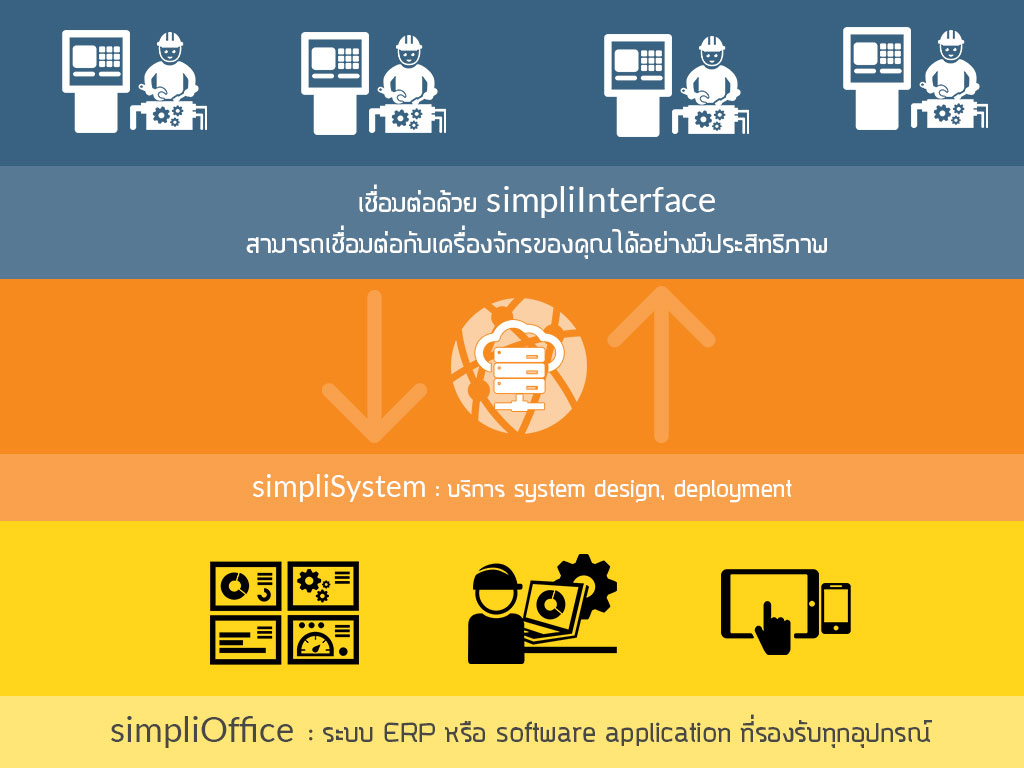
5. System Architecture
(Lightweight, scalable, secure)
             +----------------------+
             |        ERP           |
             |   (Optional Input)   |
             +----------+-----------+
                        |
         +--------------v--------------+
         |        SimpliMES Lite       |
         |    FastAPI / Django REST    |
         +--------------+--------------+
                        |
      +-----------------+-------------------+
      |                                     |
+-----v-----+                       +--------v--------+
| Web Portal|                       |  Shop Floor App |
| Managers  |                       | Tablets/PCs     |
+-----------+                       +-----------------+

           +------------------------+
           |     PostgreSQL DB      |
           +------------------------+
IoT sensors, machine interfaces (OPC-UA, Modbus), and AI modules can be added later.
6. Hardware Requirements
Shop Floor
- Tablet or touch-panel PC
- QR/Barcode scanner
- Stable WiFi or Ethernet
Server Options
- On-premise PC or mini server
- Cloud hosting (any provider)
- Docker-supported deployment
7. Implementation Timeline
| Phase | Duration | Deliverables |
|---|---|---|
| Requirements & Design | 1–2 weeks | Workflow study, screens, specification |
| Core Development | 4–6 weeks | MES modules, dashboards, integrations |
| On-site/Remote Setup | 1 week | Tablets, scanners, network config |
| Training | 1 week | Supervisor + operator training |
| Go-Live | 1 week | Stabilization & support |
Total: 7–10 weeks
8. Pricing (Reference)
| Item | Description | Price |
|---|---|---|
| Initial Implementation | Setup, workflow configuration, customizations | $50k – $120k (or local equivalent) |
| Subscription / Maintenance | Hosting, support, monitoring, updates | $800 – $2,500 / month |
| Optional Add-ons | IoT, OEE Pro, APS, AI inspection | From $3,000 |
(Pricing will be adjusted based on scope and factory size.)
9. Optional Add-On Modules
IoT Integration
- Machine status (PLC/OPC-UA)
- Sensor monitoring (temperature, humidity, vibration)
- Energy usage tracking
AI Modules
- Visual defect inspection
- OCR measurement reading
- Predictive maintenance
Advanced MES
- APS scheduling
- Warehouse management (WMS)
- Full OEE suite
- Workforce skill matrix (advanced)
10. Why Choose SimpliMES Lite
- Designed for SMEs
- Fast deployment (7–10 weeks)
- Cost-effective
- Minimal training required
- Modern UI for efficient operations
- Expandable to full MES or Industry 4.0 solution
- Backed by a full-stack engineering team
11. Next Steps
- Conduct a workflow review (remote/onsite)
- Define scope and finalize SOW
- Begin implementation
- Provide training & go-live support
Get in Touch with us

Chat with Us on LINE
iiitum1984
Related Posts
- Agentic AI in SOC Workflows: Beyond Playbooks, Into Autonomous Defense (2026 Guide)
- 从零构建SOC:Wazuh + IRIS-web 真实项目实战报告
- Building a SOC from Scratch: A Real-World Wazuh + IRIS-web Field Report
- 中国品牌出海东南亚:支付、物流与ERP全链路集成技术方案
- 再生资源工厂管理系统:中国回收企业如何在不知不觉中蒙受损失
- 如何将电商平台与ERP系统打通:实战指南(2026年版)
- AI 编程助手到底在用哪些工具?(Claude Code、Codex CLI、Aider 深度解析)
- 使用 Wazuh + 开源工具构建轻量级 SOC:实战指南(2026年版)
- 能源管理软件的ROI:企业电费真的能降低15–40%吗?
- The ROI of Smart Energy: How Software Is Cutting Costs for Forward-Thinking Businesses
- How to Build a Lightweight SOC Using Wazuh + Open Source
- How to Connect Your Ecommerce Store to Your ERP: A Practical Guide (2026)
- What Tools Do AI Coding Assistants Actually Use? (Claude Code, Codex CLI, Aider)
- How to Improve Fuel Economy: The Physics of High Load, Low RPM Driving
- 泰国榴莲仓储管理系统 — 批次追溯、冷链监控、GMP合规、ERP对接一体化
- Durian & Fruit Depot Management Software — WMS, ERP Integration & Export Automation
- 现代榴莲集散中心:告别手写账本,用系统掌控你的生意
- The Modern Durian Depot: Stop Counting Stock on Paper. Start Running a Real Business.
- AI System Reverse Engineering:用 AI 理解企业遗留软件系统(架构、代码与数据)
- AI System Reverse Engineering: How AI Can Understand Legacy Software Systems (Architecture, Code, and Data)