
In the café business, efficiency and ease-of-use are king. Staff must take, modify, and process orders swiftly. Owners want clear analytics, receipts, and integration with printers or card systems. SimpliPOS (COFF POS) aims to deliver exactly that — a lightweight, café-centric point-of-sale system with a clean interface and essential features.
Here’s a breakdown of its features, strengths, and tips for making the most of it.
What is SimpliPOS (COFF POS)?
From the web page, SimpliPOS is a web-based POS interface tailored for cafés or beverage shops. (Simplico) The interface includes:
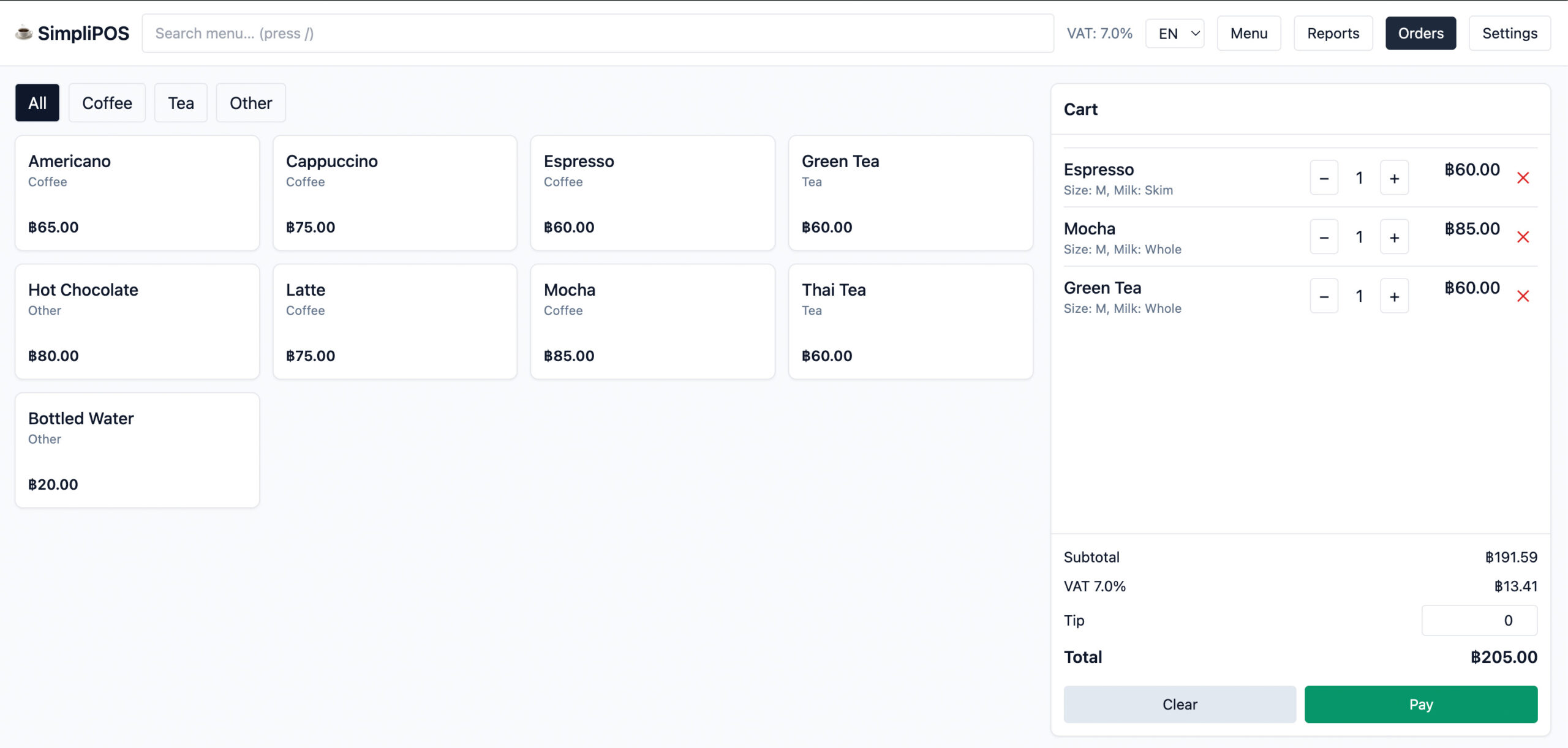
- A menu with items (add-ons, milk, notes)
- A cart where you can adjust quantities, remove items, clear, add tip, etc. (Simplico)
- Payment methods (cash, external card) (Simplico)
- Receipt preview and printing support (Simplico)
- Daily and full reports, exportable as CSV (Simplico)
- Multi-currency and locale support (e.g. THB, USD, JPY, EUR, SGD) (Simplico)
- VAT / tax settings (e.g. VAT rate, etc.) (Simplico)
- Shop setup: name, phone, email, VAT registration, etc. (Simplico)
- Preset menus by region (Thailand, Japan, USA) to help bootstrap setup (Simplico)
In short: it provides a café-grade POS that covers ordering, payments, reporting, and multi-locale settings.
Key Strengths & Differentiators
Here are what stand out as the strengths of SimpliPOS (COFF POS):
1. Simplicity & Focus
The interface is clean and uncluttered — no overly complex modules. That means baristas and staff can quickly learn it.
2. Built for cafés / beverage shops
The features reflect café operations: add-ons, milk options, notes, tip handling, and preset menus.
3. Multi-locale / Multi-currency flexibility
If your café has multiple branches in different countries, or you cater to foreign customers, the built-in support for different locales and currencies is a plus.
4. Exportable Reporting
CSV export for day or all data is useful for deeper accounting or BI analysis beyond what’s built-in.
5. Lightweight & web-based
Because it runs in a browser/web interface, you don’t need heavy local installations; updating is easier.
Potential Weaknesses / Considerations
While SimpliPOS has strong features for cafés, here are some things to check / watch out for:
- Hardware integration & compatibility: How well does it integrate with receipt printers, cash drawers, barcode scanners, etc.? The site mentions selecting a printer via system dialog, but deeper integration details are unclear. (Simplico)
- Offline / connectivity fallback: If the Internet goes down, can the system still accept orders or function? The documentation does not make this clear.
- Advanced features: Some businesses may want inventory management, supplier orders, loyalty programs, customer CRM, or kitchen display systems. Those advanced modules may or may not be built in.
- Scalability & support: If your café chain grows, will SimpliPOS scale? Is there good support, backup, security, and SLAs available?
- Localization & legal compliance: VAT/tax settings might need to be adapted to local regulations. Always ensure compliance (e.g. receipts, fiscal requirements, tax reporting) in your jurisdiction.
Use Case: How a Café Might Use It Day-to-Day
Here’s how a café might operate with SimpliPOS in practice:
- Setup shop — enter shop name, contact, VAT rate, currency, etc.
- Build menu — define categories, names, prices, mark which items are “milkable” or can have add-ons or modifiers.
- Preset menu — choose a regional template (Thailand, USA, Japan) to get starting items, then adjust.
- Serve customers — staff taps menu items, selects size/milk/add-ons, adds notes, then sends to cart.
- Process payment — choose cash or card (external), possibly add tip, and finalize.
- Print receipt — via connected receipt printer.
- End-of-day / reporting — view daily reports or export CSV data.
- Analytics — examine items sold, averages, VAT collected, etc.
This flow is intuitive, which is critical in a fast-paced environment.
Tips and Best Practices
- Start with a good menu design: having your categories, modifiers, and add-ons logically structured helps staff avoid mistakes.
- Test your hardware: before going live, test printing, cash drawer triggers, and connectivity.
- Back up data frequently: if the system allows, ensure you have backups or you export data regularly.
- Train staff on edge cases: e.g. partial refunds, order voids, or cancellation flows.
- Monitor metrics: use exported CSV data to spot slow-moving items, popular combinations, tipping patterns, etc.
- Scale gradually: if opening branches, make sure locale, tax, and currency settings are correctly configured.
Conclusion
SimpliPOS (aka COFF POS) offers a café-tailored, minimal and practical point-of-sale solution that covers the essentials: ordering, payments, receipts, and reporting. For many small-to-medium cafés, that simplicity is a strength. As with any POS, it’s crucial to test hardware compatibility, verify compliance with local tax laws, and ensure you have backup and support strategies in place.
Latest Posts
- From Durian Depot to Recycle Depot: How simpliDepot Can Manage a Material Recovery Business July 7, 2026
- 3:47 AM: Inside a Real Incident Caught by an Open-Source SOC Stack July 2, 2026
- The EV Driver App You Don’t Have to Build: QR-Code Charging with OCPP ID Tags July 2, 2026
- On-Premise LLM Deployment: Hardware, Models, and TCO for Enterprise (2026) July 1, 2026
- Launch Your EV Charging Network in 6 Steps — No Proprietary Software Required June 29, 2026
- Your Quality Records Are a Fire Hazard June 27, 2026